Create Local SEO content that ranks: A 7-step playbook
- How Local Ranking Actually Works
- A 7 Step Plan To Create Local Content That Ranks
- The Anatomy of a High Ranking City Service Page
- Multi Location Strategy Without Duplicate Content
- Local Link Earning and Distribution
- Measure What Matters and Iterate
- Common Pitfalls To Avoid
- Advanced Tips for SEO Specialists and Marketers
- Conclusion
- Make your website your most valuable performer
If your local content is just “We do X in Y”, you are leaving money on the sidewalk. The good news, unlike proximity, content is something you can control. Here is a practical, field tested playbook to create content that ranks in local search and converts neighbors into customers.
How Local Ranking Actually Works
Google’s local results lean on three pillars, relevance, distance, and prominence. Google says this explicitly in its guidance on local ranking. If your content improves relevance and prominence, you can win more visibility within the area you already serve. You can read the source in Google’s guide, Improve your local ranking on Google, which explains these factors in plain terms: Improve your local ranking on Google.
- Relevance, how well your content matches what someone searched for.
- Distance, how close the searcher is to your business or specified location.
- Prominence, how well known and trusted your business appears on and off your site.
You cannot move your building closer to every searcher, but you can make highly relevant content and boost prominence with reviews, press mentions, and authoritative resources.
A 7 Step Plan To Create Local Content That Ranks
1. Map your service and city priorities
List your primary services and the cities or neighborhoods you want to win. Turn that into a simple matrix. The intersections are the money pages, for example, Roof Repair in Dallas, Metal Roofing in Plano. Prioritize by business value and search demand.
2. Do local keyword research the right way
- Start with your service terms, then add city, neighborhood, and near me modifiers. Think plumber downtown austin, dentist cedar park, hvac repair near me.
- Mine Google Autocomplete, People Also Ask, and the bottom of SERPs for related queries.
- In Google Search Console, filter queries by city names and near me to spot quick wins.
- Validate with a keyword tool for volume and intent, but remember, low volume local queries can be high value.
3. Build a clean information architecture
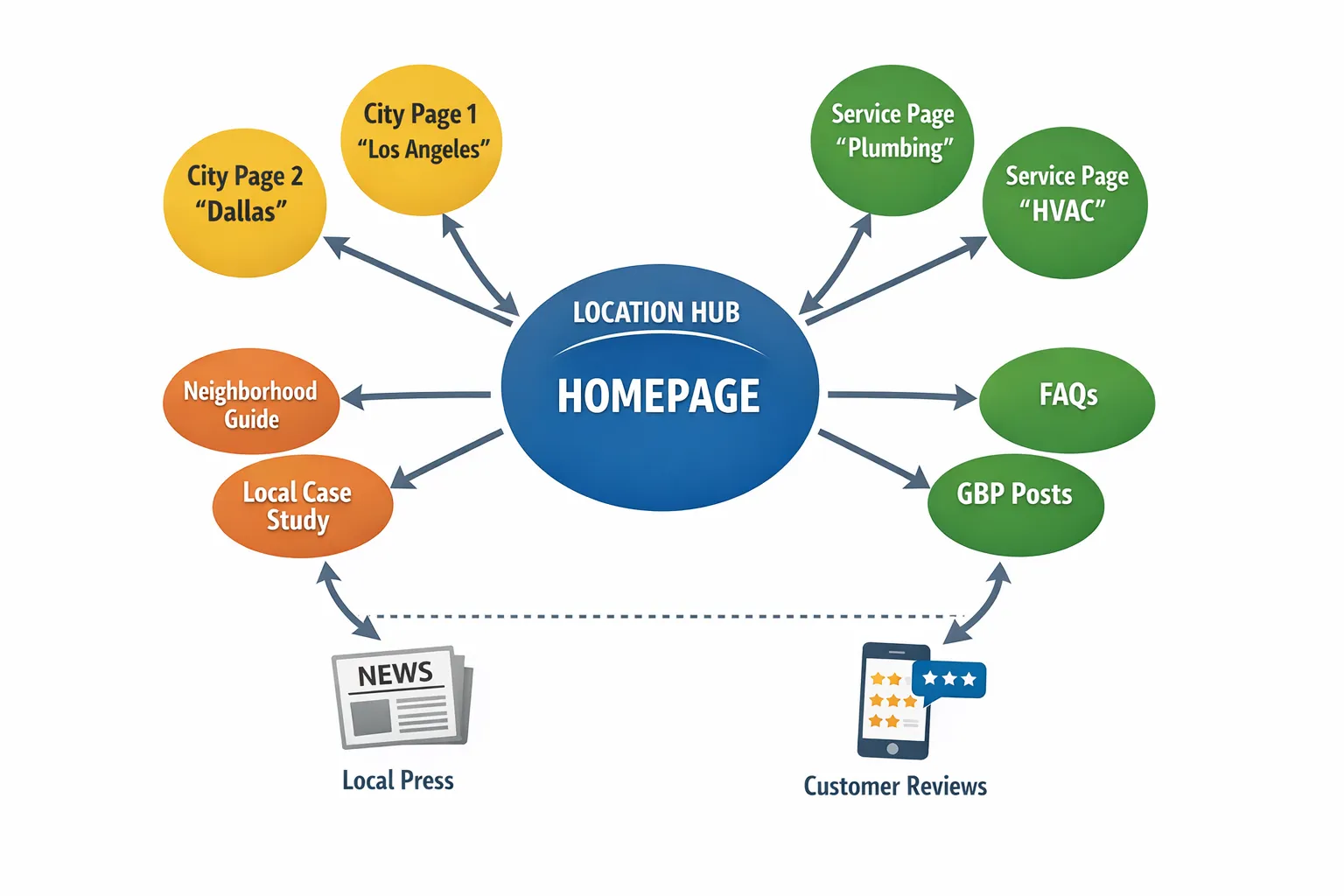
Give each target combination a dedicated page. Use a location hub page to link to every city page, and from each city page link to relevant service pages and supporting blog posts. Keep URLs readable, for example, yoursite.com/austin/roof-repair.
4. Choose content types that actually move the needle
You need two kinds of pages, transactional pages that rank and convert, and supporting content that proves expertise and earns links. Here is a quick cheat sheet.
| Content type | Primary intent | Why it ranks locally | What to include |
|---|---|---|---|
| City service page, for example, Emergency Plumber in Austin | Transactional | Directly matches query intent and city | Clear service overview, pricing signals, neighborhoods served, reviews, photos, NAP, map embed, CTAs |
| Location landing page, for multi service businesses | Transactional | Gateway for all services in one city | Intro to city, links to each service in that city, hours, NAP, parking info, team photos |
| Neighborhood guide, for example, Moving to Hyde Park | Informational | Captures research stage searches and local long tail | Landmarks, regulations, seasonal tips, local partners, internal links to relevant services |
| Case study with address level detail | Bottom of funnel | Proves real world experience nearby | Before and after photos, problem, solution, results, neighborhood name, testimonial |
| Local resource post, for example, How much does roof repair cost in Austin | Mid funnel | Builds topical authority and earns links | Pricing ranges, permit info, climate considerations, citations |
5. Write pages that sound like a neighbor, not a template
Google’s guidance on creating helpful, people first content is still the bar to clear. If you have not read it, start here: Creating helpful, reliable, people first content.
- Use the language locals use. If people say The Triangle or North Loop, use it.
- Add details only a local would know, HOA quirks, lane closures that affect service windows, seasonal issues like cedar fever.
- Show your work with photos, videos, and quotes from real jobs in that city.
6. Add the trust builders that influence both people and algorithms
Prominence is not just links. It is reputation.
- Reviews, feature a few city specific quotes and star ratings from Google Business Profile.
- Real world proof, permits pulled, certifications, awards, associations.
- Local press and partnerships, link to the city chamber, charity events, and any earned media. The more credible citations, the better.
- Author and business identity, add bios, addresses, and a consistent NAP. Follow Google’s representation rules here: Guidelines for representing your business on Google.
BrightLocal’s annual Local Consumer Review Survey continues to show that consumers rely heavily on reviews when choosing local businesses. Their 2024 edition underscores that behavior and the importance of recent, relevant feedback: Local Consumer Review Survey 2024.
7. Layer in the technical on page wins
- Title tag, Primary service, city, value proposition. Example, 24 or 7 Emergency Plumber in Austin, Fast Response, Upfront Pricing.
- H1, Match the core topic naturally. Example, Austin Emergency Plumbing and Drain Cleaning.
- URL, Keep it short, readable, and consistent.
- Internal links, Link from city pages to service pages and from supporting content back to your money pages with descriptive anchors.
- Schema, Use LocalBusiness and Service structured data where appropriate. See Google’s documentation: Local business structured data.
- Media, Compress images, use descriptive alt text that fits the photo and context, for example, Technician repairing leaking pipe in Austin Hyde Park bungalow.
The Anatomy of a High Ranking City Service Page
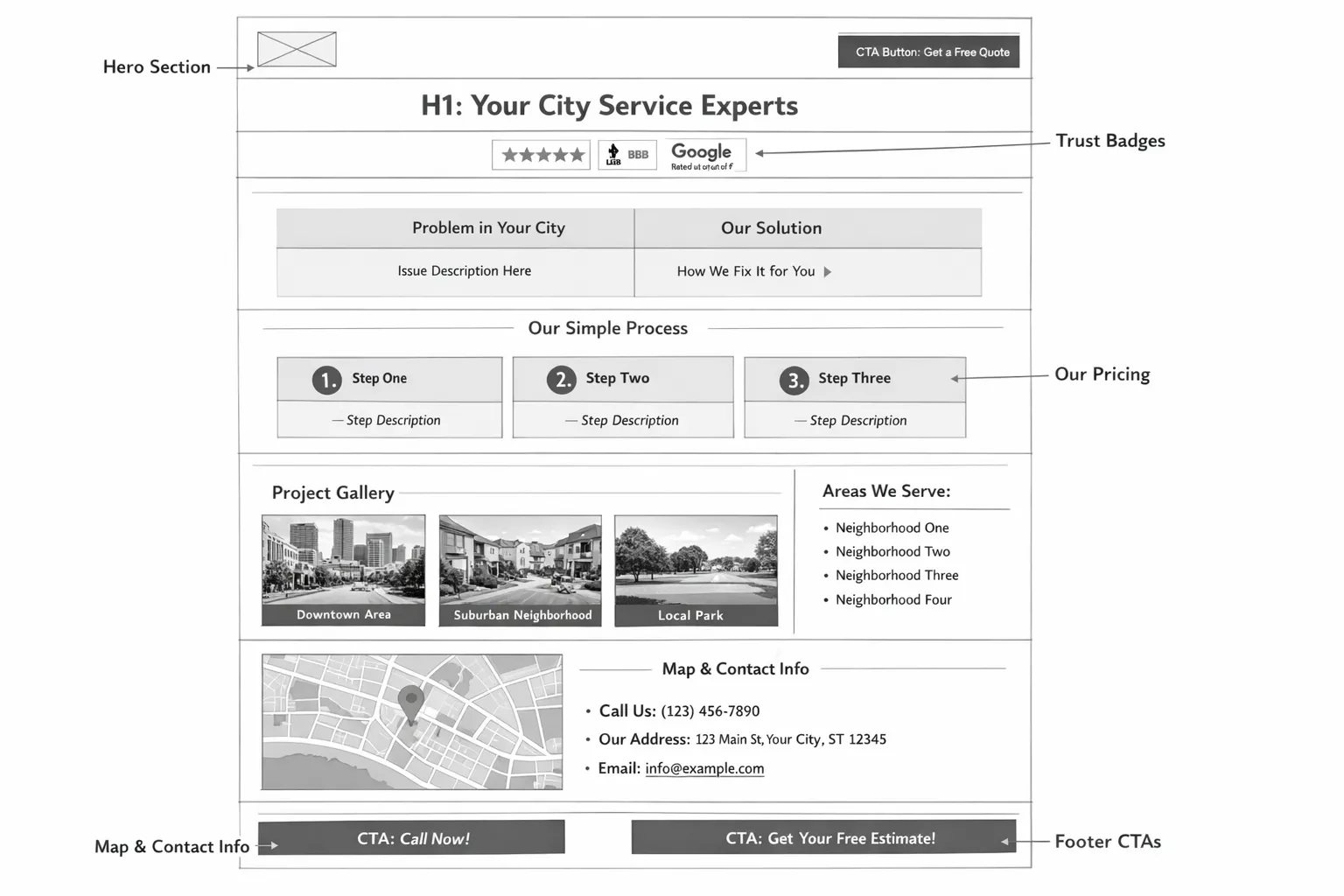
Use this outline, then adapt it to your voice and industry.
- Hero with a clear promise and city pins, H1, short subhead, primary CTA, phone number visible.
- Social proof, star rating snapshot and 2 to 3 short, city relevant quotes.
- Specific problems you fix in this city, tie issues to local context, for example, limestone foundations in Central Texas.
- Process overview, how it works in 3 steps from scheduling to follow up.
- Pricing signals or ranges, be transparent even if you ask people to call for an exact quote.
- Work gallery, original photos and short captions naming the neighborhood.
- Service area and neighborhoods list, link neighborhoods to supporting pages where it makes sense.
- Trust and credentials, licenses, insurance, supplier logos, local partnerships.
- Location and hours, consistent NAP and an embedded map for the real location.
- Secondary CTAs, request a quote, schedule online, financing info if relevant.
Multi Location Strategy Without Duplicate Content
- Use a location hub page to introduce your brand’s footprint, then link to each city page.
- Make every city page unique. Change more than the city name. Swap photos, reviews, examples, parking instructions, regulations, and local partners.
- If a service is not offered in a location, do not create a page for it. Empty pages frustrate users and waste crawl budget.
- Add internal links between nearby cities where users might compare options, for example, Austin to Round Rock.
Local Link Earning and Distribution
Great content still needs a nudge. Think local first.
- Google Business Profile Posts, publish highlights and link to the exact page you want people to visit. Use UTMs so you can track clicks in Analytics.
- Neighborhood and HOA newsletters, pitch a seasonal tip or checklist and link back.
- Local media and bloggers, offer data or a how to resource tied to the city.
- Sponsorships and partnerships, youth teams, charity events, meetups. Ask for a site link where appropriate.
Follow platform rules when you ask customers for reviews. For example, Yelp has strict policies about solicitation. Google allows you to ask but not to incentivize. Check the platform’s latest guidance before running a review drive.
Measure What Matters and Iterate
Ranking is not the goal, revenue is. Track leading indicators and outcomes.
| Metric | Where to measure | Why it matters | What to do if it is weak |
|---|---|---|---|
| Impressions and clicks for city and near me terms | Google Search Console | Early signal of visibility in your target area | Improve titles, add internal links, expand copy to cover missing subtopics |
| Local Pack actions, calls, directions, website clicks | Google Business Profile Insights | Measures activity from the map results | Add photos, post weekly, keep hours accurate, ask for reviews |
| Assisted conversions by page | Google Analytics | Shows which content helps conversion, even if not last click | Strengthen CTAs, add FAQs and trust blocks nearer to CTAs |
| Rankings by city and ZIP | A rank tracker with geo grids | Validates coverage at the neighborhood level | Create neighborhood sections, add city specific case studies |
| Backlinks and citations | Your SEO tool of choice | Prominence and authority | Pitch local press, update citations, build resource content |
Review performance monthly. Prune or consolidate thin pages. Add new sections to winning pages instead of spinning up duplicates.
Common Pitfalls To Avoid
- Boilerplate city pages that only swap the place name. Thin content rarely ranks and almost never converts.
- Stock photos that scream not local. Use your team, your vehicles, and recognizable landmarks.
- Hiding your address if you are a storefront. Service area businesses can hide addresses, storefronts should not.
- Over optimizing anchors. Keep internal links natural and helpful.
- Mass generated AI pages. Programmatic city pages without genuine value are risky and underperform.
Advanced Tips for SEO Specialists and Marketers
- Build a topical map per location. Outline parent and child entities tied to your services, then cover them with supporting posts that link to the money page.
- Use Service structured data in addition to LocalBusiness when appropriate. Align names and descriptions with on page copy.
- Consider geo specific FAQs on the page if your audience needs them, then add FAQPage schema. Only mark up what is visible.
- Capture your own data and cite it. For example, average response time this month in South Austin. Original stats build trust and attract links.
Conclusion
Local content wins when it answers the exact question a neighbor would ask, proves you do the work nearby, and makes it effortless to contact you. If you want a second set of expert eyes on your current site architecture and content plan, Altimizo can help. We build custom local SEO strategies, from keyword research and on page optimization to content creation and monthly reporting, and we offer a free initial consultation. Start here: Altimizo.
Create one excellent city service page this week, then one supporting piece that links to it. Do that on repeat and your competitors will wonder when you secretly moved next door.